
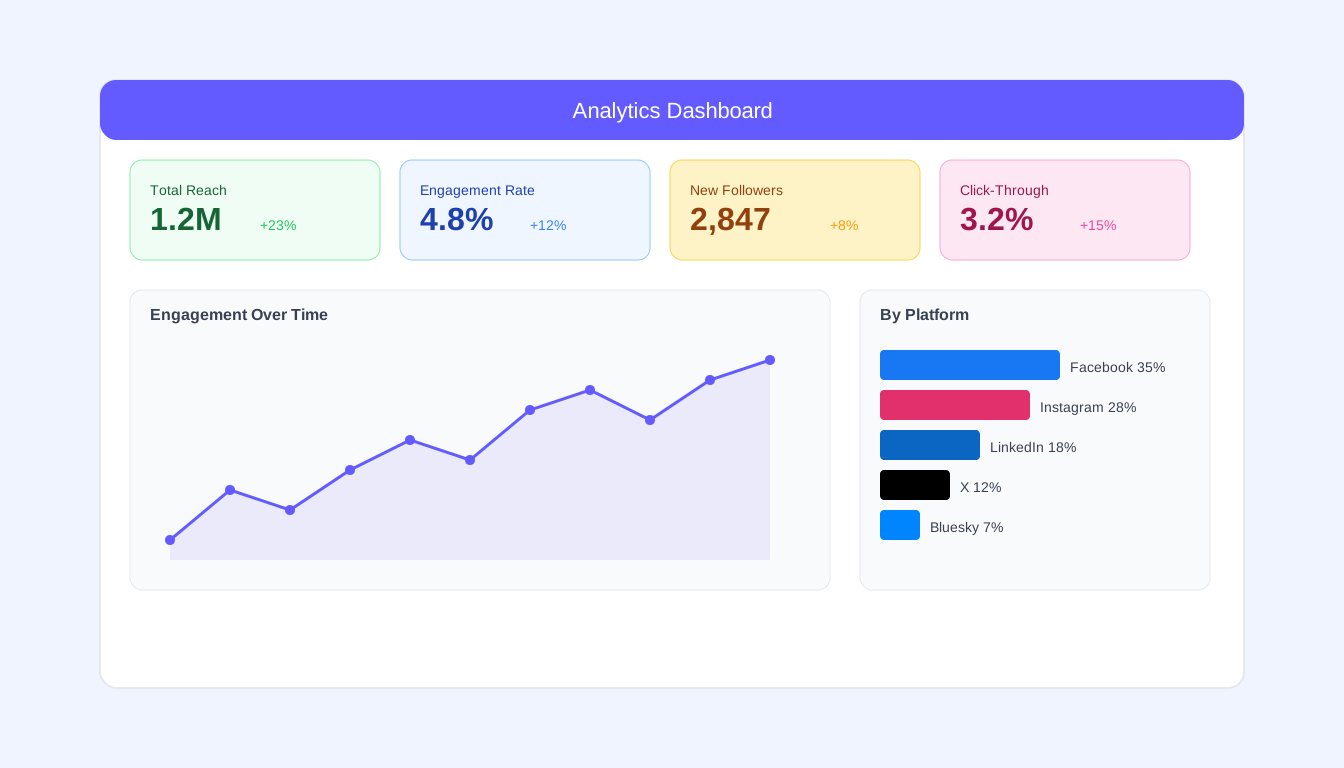
Likes feel good. But are they paying the bills? In a world drowning in social media data, knowing which metrics actually matter is the difference between vanity and value. Let's cut through the noise.
The Metrics Hierarchy
Not all metrics are created equal. Here's how to think about them:
Vanity Metrics
Numbers that look impressive but don't indicate business impact:
- Follower count (without context)
- Raw impressions
- Page likes
- Total reach
These aren't useless—but they're not the end goal.
Engagement Metrics
Indicators of content resonance:
- Likes, comments, shares
- Engagement rate
- Save/bookmark rates
- Reply rates
Better than vanity metrics, but still intermediate measures.
Business Metrics
What actually moves the needle:
- Click-through rates
- Conversion rates
- Lead generation
- Revenue attribution
- Customer acquisition cost
This is what leadership cares about.
Platform-Specific Metrics Worth Tracking
Key Metrics:
- Engagement rate (engagements ÷ reach)
- Video average watch time
- Link click-through rate
- Post reach rate (reach ÷ followers)
Often Overlooked:
- Negative feedback (hides, reports)
- Fans online timing data
- Video retention curves
Key Metrics:
- Saves and shares (algorithmic gold)
- Story completion rate
- Reel plays and watch time
- Profile visits from posts
Often Overlooked:
- Follows from post/reel
- Website clicks
- Hashtag performance
Key Metrics:
- Engagement rate by impressions
- Click-through rate on links
- Follower growth rate
- Video views (3+ seconds)
Often Overlooked:
- Post impressions by content type
- Visitor demographics
- Competitor benchmarks
X (Twitter)
Key Metrics:
- Engagement rate
- Link clicks
- Retweets vs. quote tweets
- Profile visits
Often Overlooked:
- Detail expands (people clicking to read more)
- Media engagements
- Follower growth per post
The Engagement Rate Deep Dive
Engagement rate is the single most useful metric for content performance. But how you calculate it matters:
Calculation Methods
By Reach (Most accurate): Engagements ÷ Reach × 100
By Impressions: Engagements ÷ Impressions × 100
By Followers (Easy but flawed): Engagements ÷ Followers × 100
Benchmark Ranges
| Platform | Low | Average | Good | Excellent |
|---|---|---|---|---|
| <1% | 1-3% | 3-6% | 6%+ | |
| <0.5% | 0.5-1% | 1-3% | 3%+ | |
| <1% | 1-2% | 2-4% | 4%+ | |
| X | <0.5% | 0.5-1% | 1-2% | 2%+ |
Note: These vary significantly by industry, account size, and content type.
What Affects Engagement Rate
Content Quality: Obviously.
Posting Time: When your audience is active.
Content Type: Video and carousels typically outperform static images.
Account Size: Smaller accounts often have higher engagement rates.
Platform Algorithm: Changes constantly.
Beyond Engagement: Tracking Business Impact
Setting Up Proper Attribution
UTM Parameters: Track every link with UTM codes
- utm_source: Platform (facebook, instagram, etc.)
- utm_medium: Content type (post, story, bio)
- utm_campaign: Campaign name
- utm_content: Specific post or A/B test variant
Example URL:
yoursite.com/page?utm_source=instagram&utm_medium=bio&utm_campaign=summer_sale
Conversion Tracking
Platform Pixels: Install tracking pixels for:
- Meta Pixel (Facebook/Instagram)
- LinkedIn Insight Tag
- X Pixel
Goal Tracking: Configure in your analytics tool:
- Form submissions
- Sign-ups
- Purchases
- Content downloads
Customer Journey Analysis
Social media rarely works in isolation. Track:
- First touch attribution (where did they discover you?)
- Multi-touch attribution (all touchpoints)
- Time to conversion (how long from first touch to sale?)
Building a Metrics Dashboard
Essential Views
Daily: Quick health check
- New followers/unfollowers
- Engagement on recent posts
- Any unusual activity
Weekly: Performance review
- Top/bottom performing content
- Engagement rate trends
- Traffic from social
- Lead generation
Monthly: Strategic analysis
- Platform comparison
- Content pillar performance
- ROI by platform
- Goal progress
Key Performance Indicators (KPIs)
Choose 3-5 KPIs that align with business goals:
Brand Awareness:
- Reach growth rate
- Share of voice
- Brand mention volume
Engagement:
- Overall engagement rate
- Average comments per post
- Save/share ratio
Traffic:
- Clicks to website
- Traffic from social (%)
- Bounce rate from social traffic
Conversion:
- Leads from social
- Conversion rate
- Revenue attributed to social
Analytics Tools and Platforms
Native Platform Analytics
Every platform offers built-in analytics:
- Meta Business Suite: Facebook and Instagram
- LinkedIn Analytics: Page and personal
- X Analytics: Comprehensive post data
Pros: Free, accurate, detailed Cons: Platform-specific, no cross-platform view
Third-Party Tools
Tools like Pylot aggregate data across platforms:
- Cross-platform dashboards
- Competitor benchmarking
- Automated reporting
- Historical data retention
Pros: Unified view, time-saving, advanced features Cons: Cost, potential data delays
Web Analytics Integration
Connect social data to web performance:
- Google Analytics 4
- Attribution platforms
- CRM integration
Content Performance Analysis
What to Measure Per Post
Reach Metrics:
- Impressions
- Unique reach
- Viral reach (shares)
Engagement Metrics:
- Total engagements
- Engagement rate
- Engagement breakdown (likes vs. comments vs. shares)
Action Metrics:
- Link clicks
- Profile visits
- Follows from post
Identifying Patterns
Look for correlations:
- Do questions get more comments?
- Do videos get more shares?
- Do carousel posts get more saves?
- Which posting times perform best?
- What caption lengths work?
A/B Testing Framework
Test one variable at a time:
- Hypothesis: "Videos will get more engagement than images"
- Test: Post similar content in both formats
- Measure: Compare engagement rates
- Conclude: Was the hypothesis correct?
- Apply: Adjust strategy based on findings
Reporting Social Media ROI
The ROI Formula
ROI = (Return - Investment) ÷ Investment × 100
Return (what you gained):
- Revenue attributed to social
- Value of leads generated
- Cost savings (customer service via social)
Investment (what you spent):
- Tool costs
- Ad spend
- Team time (hourly rate × hours)
- Content creation costs
Building the Business Case
Frame metrics in business terms:
- "Our social media efforts generated 150 qualified leads this month"
- "Instagram drove $25,000 in attributed revenue"
- "Customer support via social saved 50 support tickets"
Reporting to Leadership
What they care about:
- Revenue impact
- Cost efficiency
- Competitive position
- Growth trajectory
What they don't need:
- Detailed engagement breakdowns
- Platform-specific minutiae
- Vanity metrics
Common Analytics Mistakes
Comparing Incomparable Metrics
Instagram engagement rate ≠ LinkedIn engagement rate. Each platform has different norms.
Chasing Viral Hits
One viral post doesn't make a strategy. Focus on sustainable performance.
Ignoring Context
A "bad" month might coincide with platform algorithm changes, seasonality, or external factors.
Over-Measuring
Not everything needs to be tracked. Focus on metrics that inform decisions.
Under-Measuring
But don't fly blind. At minimum, track engagement rate, traffic, and conversions.
Short-Term Thinking
Social media builds over time. Monthly fluctuations matter less than quarterly and yearly trends.
Advanced Analytics Strategies
Cohort Analysis
Track how different audience segments engage over time:
- When did they follow?
- How active are they?
- What content resonates with each cohort?
Sentiment Analysis
Beyond engagement numbers, understand sentiment:
- Are comments positive or negative?
- What topics drive different reactions?
- How does sentiment trend over time?
Competitive Benchmarking
Track competitors':
- Posting frequency
- Engagement rates
- Content types
- Growth rates
Predictive Analytics
Use historical data to forecast:
- Expected performance for content types
- Optimal posting times
- Campaign outcome projections
How Pylot Simplifies Analytics
Pylot turns data into insights:
Unified Dashboard
See all platforms in one view. Compare performance across Instagram, Facebook, LinkedIn, and X without switching tools.
Automated Reports
Schedule weekly or monthly reports delivered to your inbox. Share with stakeholders without manual compilation.
Content Performance Insights
Pylot identifies what makes your top posts succeed:
- Best content types
- Optimal posting times
- Effective caption patterns
- Hashtag performance
Goal Tracking
Set KPIs and track progress. Know if you're on track to hit monthly targets.
AI-Powered Recommendations
Pylot doesn't just show data—it suggests actions:
- "Posts with questions get 40% more comments"
- "Your audience is most active Tuesday at 9 AM"
- "Video content outperforms images by 2x"
Conclusion
Social media analytics shouldn't be overwhelming. Focus on the metrics that connect to business outcomes, track them consistently, and use insights to improve over time.
Remember: the goal isn't to have the best metrics—it's to use metrics to make better decisions.
Ready to make sense of your social media data? Try Pylot free and transform numbers into actionable insights.